

Betebet Login and Registration Guide
This page explains, in plain language, every step of membership at Betebet – from opening an account and signing in securely to document verification and address changes.
* reported values; they may change from period to period
Why Become a Betebet Member?
Membership of a betting and casino platform means far more than simply browsing the site: it gives you a personal account, a balance and a transaction history. Without an account you can look at the odds and the game lobby, but building a bet slip, making a deposit, joining promotions or requesting a withdrawal all require a registered and verified account. That is why the decision to sign up should be made only once the services on offer and the rules behind them are properly understood.
A large share of users reach the site through a search engine. Because the address changes from time to time, queries such as “betebet latest login” or “betebet current login” are very common – players in Turkey type the same thing in Turkish as “betebet giriş”. The answer to these queries is explained further down this page, through the address pattern and the official announcement channels.
Services Available to Members
- Sports betting: According to reported information, pre-match and live betting on more than 20 sports, plus virtual sports.
- Casino: More than 1,000 reported games from providers such as Pragmatic Play, Evolution, NetEnt, Play'n GO, Ezugi and Microgaming.
- Cashier: Deposits and withdrawals via methods such as Papara, PayFix, bank transfer (havale/EFT), Cepbank, QR, cards and crypto.
- Promotions: Welcome, loss and payment-method bonuses listed on the promotions page; terms may change from period to period.
According to reported information, the platform is operated by Total Gaming Solutions B.V. and has been active since around 2013. Searches also show different spellings such as “betebet new login”; whichever wording you search with, the correct address should always be confirmed through the official channels. Registration is open only to users aged 18 and over.
Betebet Registration Step by Step
The registration form usually consists of a single page or a few short steps and takes only a few minutes to complete. Because the details you enter will later be compared with your documents during verification, the most important rule is to enter everything exactly as it appears on your identity document. Accounts opened with a nickname or someone else's details are likely to run into problems at the withdrawal stage.
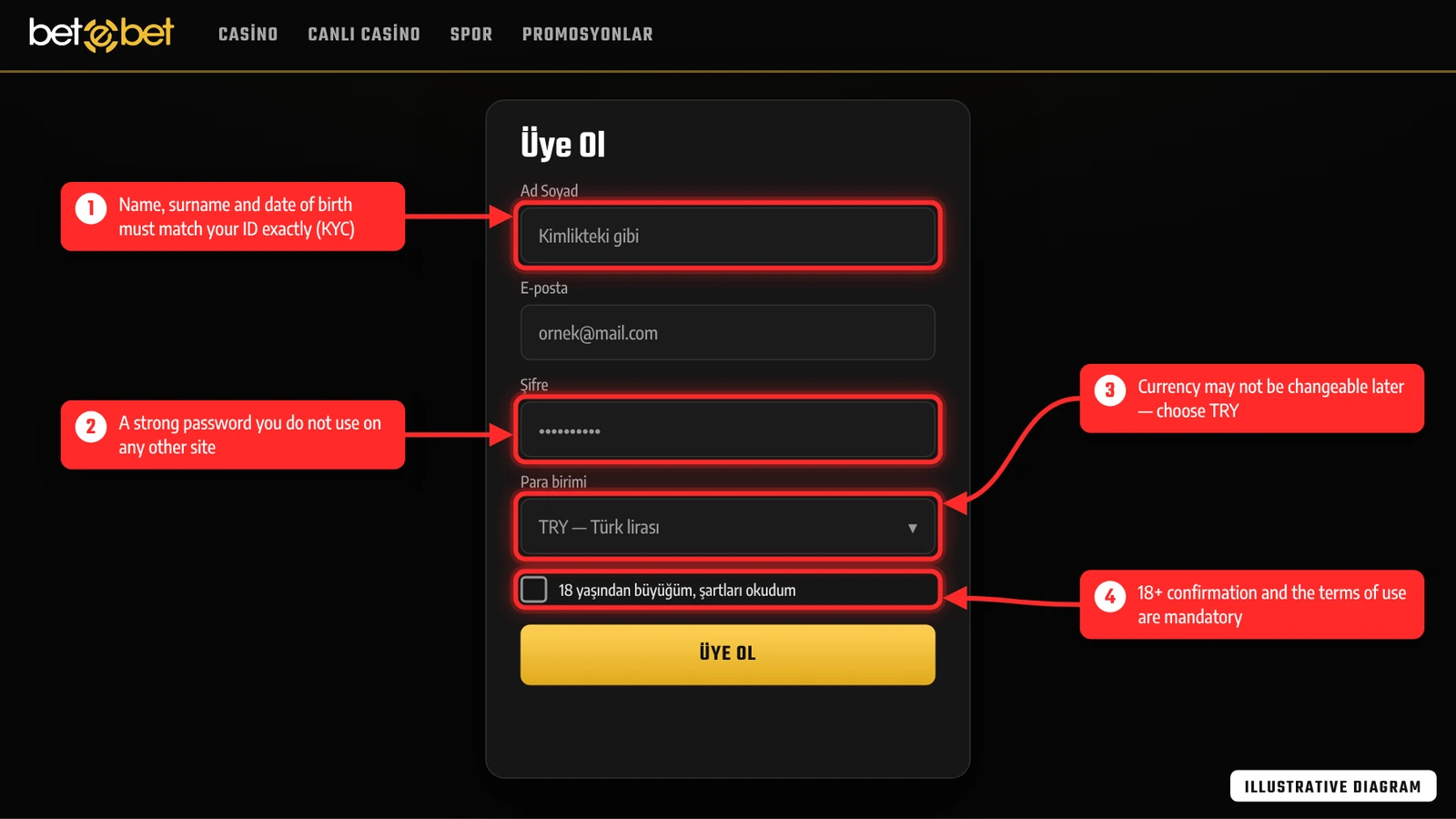
The diagram above numbers the four fields of the registration form that deserve the most attention. (1) First name, surname and date of birth must match your identity document exactly; otherwise document checks at the first withdrawal take longer. (2) The password should be strong, contain letters, numbers and symbols, and not be used on any other site. (3) Turkish lira should be selected, as the currency may not be changeable after registration. (4) The 18+ confirmation and acceptance of the terms of use are mandatory.
- 01
Verify the official address
Confirm the current address through the operator's official social media accounts, SMS or e-mail announcements, and check for the HTTPS padlock in the address bar.
- 02
Click the Sign Up button
Open the registration form with the sign-up button in the top right-hand corner of the home page (labelled “Kayıt Ol”, Sign Up, on the Turkish interface).
- 03
Enter your personal details
Fill in your first name, surname and date of birth completely and accurately, exactly as they appear on your identity document.
- 04
Set your contact and account details
Enter your e-mail address, mobile number, a username and a strong password, then choose TL as the account currency.
- 05
Read and accept the terms
Read the terms of use and the bonus rules, confirm that you are over 18 and submit the form.
- 06
Verify the account
If a verification code is sent by SMS or e-mail, enter it, then check your profile details and sign in for the first time.
Common Mistakes When Filling in the Form
- Wrong date of birth: Mixing up the day and month fields leads to a mismatch during document verification.
- Temporary e-mail: Password resets and address announcements arrive by e-mail, so choose an address you use regularly.
- Weak password: Passwords that match your year of birth or your username are easy to guess.
- More than one account: Opening a second account with the same person, device or payment method is generally against the rules and may lead to bonuses being cancelled.
Once registration is complete, it is worth checking in the profile section that your details have been saved correctly. If your phone number and e-mail have not been verified, participation in some promotions or withdrawal requests may be put on hold. Looking at the minimum and maximum limits of each method in the cashier before your first deposit also makes the next steps easier.
Registration works the same way in a mobile browser; the form is shown in a single column to fit the phone screen and the keyboard switches automatically depending on the field. When filling in the form on a phone, make sure autofill has not inserted a wrong name or an old e-mail address. The welcome e-mail you receive after signing up should not be deleted, because it comes from the same channel through which each new betebet login address is announced, so add the sender to your contacts. This also stops those announcements from landing in your spam folder.
How to Claim the New Member Bonus
Two kinds of offer stand out for new members on the promotions page: a welcome bonus linked to the first deposit and a trial bonus (deneme bonusu) that is reported not to require a deposit. As amounts and conditions can change from period to period, the information below should be read as a summary of values reported at different times.
| Promotion | Reported value | Reported condition |
|---|---|---|
| Sports welcome bonus | 100% on the first deposit, up to 500 TL | A cap of 250–300 TL has also been reported in earlier periods |
| Trial bonus | 15 TL | No previous transactions on the account; may need to be requested via live support |
| Minimum deposit | Usually 100 TL | Reported to start from 25 TL for the PayFix bonus |
| Wagering | 10–20 times the deposit + bonus total | Separate rules for sports and casino |
| Validity | 7 days | The bonus and its winnings may be removed once the period expires |
| Maximum withdrawal | 5,000–10,000 TL | For winnings generated from the bonus balance |
Steps for a Betebet Bonus Request
- 01
Read the promotion terms
On the promotions page, check the bonus rules on minimum deposit, wagering, validity period and excluded games.
- 02
Make a qualifying deposit
Deposit the amount and use the method the promotion requires; starting to play before requesting the bonus may make some offers invalid.
- 03
Activate the bonus
The bonus is activated on the promotions page or requested through live support (known as “bonus isteme”, requesting a bonus).
- 04
Track the wagering
Monitor the remaining wagering amount in the account section; only one bonus can be active at a time.
The wagering requirement states how much has to be bet before the balance that comes with a bonus becomes withdrawable. For example, a 100 TL deposit plus a 100 TL bonus with 10x wagering requires a total betting volume of 2,000 TL. Using a bonus is not compulsory; a user who does not find the terms suitable can simply deposit without one. Some payment-method bonuses are reported to be described as wager-free on the promotions page, although this too can change from period to period. Other promotions such as a loss bonus, refer-a-friend and a VIP programme are also reported to exist; the details and current rates should be checked on the promotions page.
Steps for a Secure Sign-In to Your Betebet Account
Signing in is a simple process in which you enter your username or e-mail address and your password; the real point to watch is that these details are entered on the right site. Copycat sites may appear after address changes, and a page that looks identical may have been built to harvest the credentials typed into it. A secure sign-in to Betebet therefore starts with verifying the address.
- 01
Get the address from an official channel
Find the new address through the official social media accounts, or the SMS and e-mail messages sent to members.
- 02
Check the link
In the address bar, check the HTTPS padlock, the spelling of the domain and the pattern of a number followed by the brand name.
- 03
Enter your details
Click the sign-in button and type your username or e-mail address and your password.
- 04
Complete the extra verification
If additional verification is enabled on your account, enter the SMS or app code.
- 05
Sign out
On shared devices, sign out when you have finished and do not use the “remember me” option.
Rather than typing “betebet current login” into a search engine and clicking the first link that comes up, treat those results only as a starting point. Likewise, pages that answer the question “betebet latest login” may sometimes show an old or incorrect number. The correct number always appears on the operator's own announcement channels.
Spotting Betebet Copycat Sites
- Domain name: Addresses with a changed letter, an extra hyphen or a different extension should be examined carefully.
- Excessive promises: Unrealistically high bonuses or “today only” warnings are tactics frequently used by copycat sites.
- Payment requests: A page that asks for card details or an extra payment during sign-in may not belong to the operator.
- Footer details: Check that the footer lists the company name, contact details and links to the terms.
If an address found through searches such as “betebet new login” is checked against the points above before any credentials are entered, the risk drops considerably. Your browser's password manager also acts as an extra warning, since it will not autofill on a domain it has not saved.
Forgotten Password: Account Recovery
If you forget your password, use the “Forgot password” link (“Şifremi unuttum” on the Turkish interface) on the sign-in screen. You will usually be asked for your registered e-mail address or phone number, and a reset link or code is sent to that channel. As the link may only be valid for a limited time, complete the process as soon as the e-mail arrives.
- 01
Start the reset request
On the sign-in screen, click the password reset link and type your registered e-mail address or phone number.
- 02
Check your inbox
If the e-mail has not arrived, look in your spam folder; request it again after a few minutes.
- 03
Set a new password
Choose a password you have not used before, at least 10 characters long and containing letters, numbers and symbols.
- 04
Review your sessions
After signing in with the new password, check that your account details and transaction history have not changed.
If you no longer have access to the registered e-mail or phone, account recovery is handled through live support. In that case your first name, surname, date of birth and sometimes an identity document may be requested to confirm who you are. Live support hours may change from period to period; e-mail requests are reported to be answered within 12–24 hours. Once access is restored, bookmark only a betebet login address you have verified through official channels. Support staff will never ask for your password; do not reply to any message that does.
Why Is Document Verification (KYC) Necessary?
KYC (Know Your Customer) is an identity verification process generally applied by online betting and casino operators. Its purpose is to confirm that the account really belongs to the person named on the registration form, that the user is over 18 and that payments are made from the user's own accounts. The process protects against both fraud and accounts being opened in someone else's name.
Verification is most often triggered by the first withdrawal request, by high-value transactions or when unusual activity is noticed on the account. According to reported information, the document review can take 1–2 business days, and a withdrawal request may be held during this time. Document requests and delays in this process are among the most common topics on public complaint boards; sending complete and legible documents from the outset shortens the wait.
Completing Verification Early on Your Betebet Account
If there is a document upload area in your account profile, sending your documents without waiting for the first withdrawal speeds up later transactions. The first name, surname and date of birth on your documents must match the registration form exactly; if there is a discrepancy, it is better to contact live support first and ask for the profile details to be corrected. The fact that withdrawals are made only to bank, Papara or crypto accounts registered in the member's own name is also part of this process.
Which Documents Does Betebet Request?
The documents requested can vary by user and transaction; the list below summarises those generally requested by online betting platforms. Which document is needed is communicated together with the verification request, by e-mail or as an account notification.
| Document type | Example | Purpose |
|---|---|---|
| Identity document | ID card, passport or other official photo ID (front and back) | Confirms name, surname and age |
| Proof of address | A utility bill or certificate of residence from the last 3 months | Confirms the registered address |
| Proof of payment | Bank statement, Papara account screen or a partly covered photo of the card | Confirms that the payment method belongs to the member |
| Selfie | A photo taken holding the identity document | Confirms that the document belongs to the account holder |
Tips for Sending Your Betebet Documents
- Legibility: All four corners of the document must be visible; glare, blur and cropped edges are reasons for rejection.
- Card security: On the card photo, cover all digits except the first 6 and last 4, as well as the security code on the back.
- Validity: Expired identity documents and old bills are generally not accepted.
- Channel: Send documents only through the upload area in your account profile or the official support e-mail address.
Documents should never be shared via social media messages or through people you do not know. After submission, you can follow the status of the review through account notifications or live support.
Setting Up Two-Factor Authentication (2FA)
Two-factor authentication requires, in addition to your password, a one-time code sent to your phone or generated by an app. This makes it harder for anyone else to access the account even if the password is compromised. Whether 2FA is offered and which method it uses depends on the platform's current account settings, so the steps below apply only if such an option is available in your account settings.
- 01
Check the settings
In your account profile, open the security or password section and see whether a two-factor authentication option is available.
- 02
Choose a method
Pick one of the options: an SMS code or an authenticator app such as Google Authenticator.
- 03
Pair the device
If you chose an app, scan the QR code on screen with the authenticator app and enter the code it generates.
- 04
Store the backup codes
Write down any backup codes provided and keep them somewhere safe away from your phone.
If there is no 2FA option in the account settings, similar protection can be achieved with a strong, unique password, two-factor authentication on your e-mail account and a screen lock on your device. The security of your e-mail account is especially important, because password reset links are sent to that address. When you change phones, remember to transfer the authenticator app to the new device. If the backup codes are lost and you no longer have the phone, you will need to contact live support and pass identity verification to regain access to the account; depending on how accurate your registered details are, this may take some time. If you see an unexpected sign-in notification or a transaction you do not recognise on the account, changing your password immediately and reporting it to the support team is the quickest precaution.
Betebet Sign-In Problems and Solutions
The most common cause of sign-in problems is a change of address. Reported addresses follow a pattern made up of a number and the brand name, such as “1125betebet” or “1126betebet”; when the address changes, the number usually goes up. However, which number is current cannot be given as a single fixed fact. The information users look for when they search “betebet latest login” is announced on the operator's official social media accounts and in the SMS and e-mail messages sent to members.
| Problem | Possible cause | Solution |
|---|---|---|
| The page will not open | An old address is being used | Find the new number through official channels and update your bookmark |
| Password not accepted | Upper/lower case, keyboard language or an old password | Check the keyboard and reset the password if necessary |
| Account locked | Several failed attempts in a row | Wait for a while or contact live support |
| Page loads only partly | Cache or an outdated browser | Clear the cache and cookies, and update the browser |
| Code does not arrive | SMS delay or a wrong number | Wait a few minutes and confirm your profile number with support |
Some of the pages listed in searches for phrases such as “betebet current login” and “betebet new login” are not official and may keep showing old addresses. So when the address changes, the first thing to do is check the latest announcement on the official channels. Access problems after a domain change are among the most frequent topics on public complaint boards; most of them resolve themselves once the correct address is reached.
Frequently Asked Questions
Is there a fee to register?
No. The registration form is free; costs can only arise from deposits the user chooses to make, in the form of bank or crypto network fees.
Which search result should I trust when looking for the current address?
Search results are only a starting point. The address should be confirmed through the operator's official social media accounts or its SMS and e-mail announcements.
Is the trial bonus given to everyone?
A 15 TL trial bonus is reported on the promotions page; conditions such as no previous transactions on the account apply, and the request can be made through live support. Terms may change from period to period.
How long does document verification take?
According to reported information, the review usually takes 1–2 business days. Documents that are legible and consistent with your registration details shorten the process.
Why does the betebet login address keep changing?
The domain changes from time to time and the new address is published in the pattern of a number followed by the brand name. If the old address does not open, checking the latest announcement on the official channels is enough.
Can I share my account details with someone else?
No. The account is personal; sharing the details weakens its security and may lead to transactions being stopped because of use that breaks the rules.

Verified: November 4, 2026 · Operator promotion, cashier and terms pages reviewed